HiPole / Trace

What’s new

From the first launch to today: the milestones that shape Trace.

  1. v2.2.0Current version

    A public demo and first-party visit analytics

    • Explore the specified ACC / Kyalami lap comparison without a PIN, including 3D replay, telemetry, Delta and G-G.
    • The demo uses a separate read-only snapshot: no file imports, other tracks or history edits. Administrators can publish, update or disable it.
    • Added visit trends, estimated visitors, sessions, sources, key actions and recent activity; application memory is shown separately from traffic metrics.
    • Analytics uses first-party pseudonymous identifiers, without storing raw IP addresses, full referrer URLs or telemetry content, and respects DNT/GPC.
  2. v2.1.0

    A clear record of every step forward

    • View the changelog from the product homepage, Laps, sign-in page and administration footer.
    • Read the product history in Chinese or English, from the first launch to the latest release.
  3. v2.0.0

    The Trace product homepage and a bilingual experience

    • Unified the Trace identity, visual design, logo and favicon under HiPole.
    • Added a public product homepage with feature previews, workflow, FAQ and planned tiers; moved the replay workspace to /laps.
    • Adapted Nexsas floating navigation and once-only scroll reveals, with improved readability and responsive layouts.
    • Added Chinese and English across the homepage, PIN sign-in, Laps and administration; workspace language changes preserve imported data, lap selection and playback position.
    • Improved branded titles, multilingual search and sharing metadata; administration and driving data remain private and excluded from indexing.
  4. v1.3.0

    Faithful replay of recorded GPS

    • VBO uses a fixed track coordinate transform, without per-file automatic or manual translation or racing-line snapping.
    • Preserved recorded GPS drift and kept off-track traces and cars visible; display-height handling does not alter horizontal position.
    • Verified VBO channel layouts from different cars and improved raw-data persistence and legacy-record labels.
  5. v1.2.0

    Real-world VBO joins the main workspace

    • Added real-world VBO alongside AC/ACC simulation data, for the registered Tianfu main circuit.
    • Supported laps from multiple files, A/B replay, GPS-based virtual timing, matched-progress Delta and available channels including front/rear brake pressure.
    • Added saved VBO laps and historical retrieval; the per-file translation explored at this stage was replaced by fixed coordinates in v1.3.0.
  6. v1.1.0

    GT race-car illustrations

    • Added a GT car shape, selected automatically for ACC; AC defaults to a touring car.
    • Allowed independent A/B model overrides while preserving playback time, camera and comparison reference.
  7. v1.0.3

    A more cohesive visual identity

    • Refined colours, typography, numeric presentation, cards and interaction states.
    • Retained cyan/orange A/B identities and improved data readability and interface consistency.
  8. v1.0.2

    4K layouts and a unified right sidebar

    • Removed the large-screen width constraint and sized the track and telemetry areas to the viewport.
    • Combined live channels and G-G in a continuous right sidebar, with more comfortable channel spacing.
  9. v1.0.1

    Clearer lap selection and information

    • Moved lap completeness and sampling details into the lap picker’s information popover.
    • Grouped source files, lap times and sample provenance in the left sidebar; focused the right sidebar on live channels.
    • Added consistent footer version labels and improved desktop space usage and chart layout.
  10. Product update

    ACC and Kyalami support

    • Added ACC telemetry CSV, track registration and game isolation, with verified Kyalami replay.
    • Used ACC lap-completion confirmation to identify comparable laps, supporting A/B, Delta, G-G and saved history.
  11. Product update

    Early usability and track improvements

    • Added G-G and reference-lap comparison beside the telemetry charts, removing the redundant raw-value table.
    • Improved saved-lap discovery and loading feedback; fixed B-lap selection after adding CSV to a historical lap.
    • Reduced Tianfu and Tianma geometry to track, kerbs and pit lanes; added browser geometry caching and in-place model updates.
    • Added a favicon and support footer, and improved pause, speed, gear and pedal displays.
  12. Product update

    First launch · AC telemetry replay

    • Launched AC Mod conversion and GLB/JSON registration, with track-keyword validation for telemetry CSV.
    • Provided complete-lap selection, 3D A/B traces, overview/free/follow cameras and linked telemetry charts.
    • Added saved laps organised by driver and notes, with PIN access and separate administration.

From sim to circuit · Driving data replay & comparison

Beyond lap time,
see the details of your driving.

Put racing lines, braking and acceleration back on track.
Review every lap from a shared perspective. Understand every difference.

Built for drivers and coachesACACCReal-world VBO
Trace / LapsReplay & analysis workspace
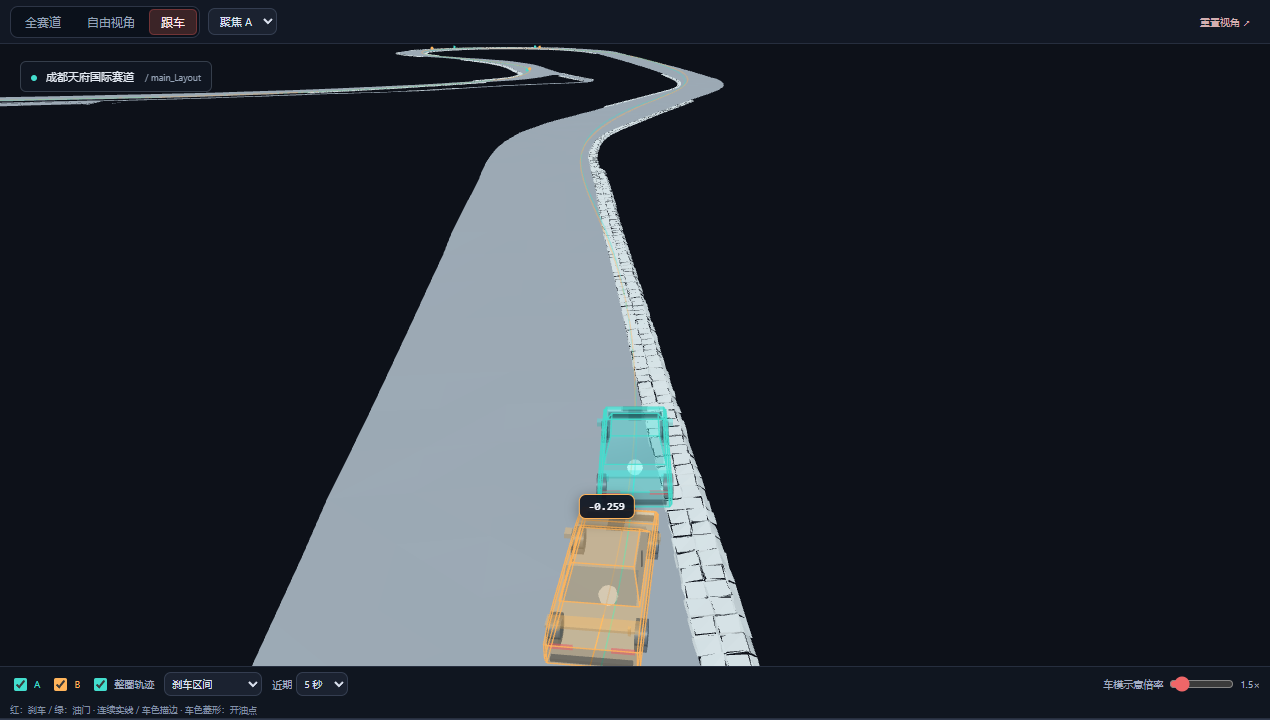
A cyan and an orange car replaying two laps on a 3D track in Trace Laps
Put each driving input back on track.Simulated telemetry demonstration · Not live data

01 / Replay & compare

The difference is in
every corner.

See more than the time gained.
Understand where you gained it.

01

See where two laps diverge.

Replay two laps together in 3D. Compare turn-in positions, braking zones and corner-exit throttle points. Switch between overview, free camera and follow views at your own pace.

3D racing linesBraking zonesThrottle-on points
02

Connect the input to the outcome.

Follow speed, throttle, braking, steering and gear along the timeline. Use matched-progress Delta to find where time is gained or lost. Click a chart to return to that position.

Dual telemetry chartsMatched-progress DeltaLinked replay
03

Keep references. Build a repeatable training process.

Pick laps across files and save useful references to your library. Organize them by driver and note, then pick up where you left off at your next session.

Laps across filesSaved lapsReusable reference laps

02 / G-G analysis

Use data to take
every review
one step further.

See differences in lateral and longitudinal acceleration. Add a reference lap, speed and racing lines to build a clearer picture of each driving decision.

Open the analysis workspace
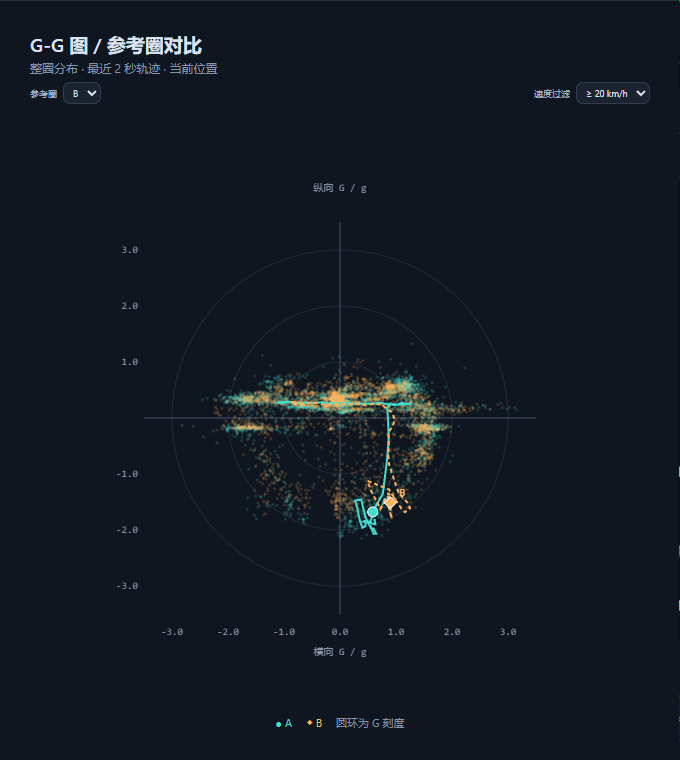
G-G distributions for the reference and observed laps
A · Observed lapB · Reference lapAsk questions from the distribution. Find evidence in racing lines and telemetry.

03 / Sim & real

From simulator practice
to real-world circuits.

A familiar review workflow,
across different driving environments.

Simulator

AC / ACC

Import AC or ACC CSV telemetry to compare racing lines, throttle, braking and lap times together.

Available tracks depend on the Laps library CSV
Real-world data

Real world / VBO

Import a real-world VBO to replay GPS trajectories and speed, and compare the telemetry channels available in the file.

Supported track: Chengdu Tianfu International Circuit VBO

Keep the evidence for your next session

Make one review
the starting point for your next lap.

Start a review
  • Compare racing lines and driving inputs on the same track
  • Locate a difference in the charts and return to that corner
  • Save useful laps and build your training references
A / B lap comparisonFeature illustration
A · Observed lapB · Reference lapLines / Inputs / Delta

Drivers and coaches, looking at the same corner.

Turn “you can be faster here” into a specific question. Use 3D lines and telemetry to discuss different turn-in, braking and corner-exit decisions.

Reference lap libraryFeature illustration
Practice · Reference lapTrack · Driver · Date · Note
Saved
Qualifying · Reference lapReady for your next review
Reusable

A valuable lap is worth revisiting.

Pick individual laps from different files and save them by driver and note. Bring a reference back next time and keep building on what you learn.

04 / Start your review

Three steps to your next insight.

From a recording to a focused training question.

  1. 01

    Choose your track

    Open Laps, enter the access PIN, then select your data source and track.

    Set the scene for your review
  2. 02

    Add your data

    Add CSV or VBO files, or load previously saved laps.

    Find the two laps you want to compare
  3. 03

    Compare and find your next step

    Select two laps and compare racing lines, driving inputs and time differences together.

    Take a focused question back to practice

05 / Plans

From personal review
to a structured training workflow.

Start with Free today. More capabilities for coaches and teams are being planned.

Free

Available now

Start by understanding every lap.

FreeCurrent version
Open Free

Enter with your team's PIN

  • AC / ACC CSV and real-world VBO import
  • 3D replay and A/B lap comparison
  • Telemetry, matched-progress Delta and G-G
  • Saved laps and reusable references

See the FAQ below for track and channel availability.

Coach

Planned

Make feedback specific. Track the progress.

For coachesPricing to be announced

Potential paid features

  • Corner annotations and driving feedback
  • Structured review reports and export
  • Training trends across sessions
  • Shared reviews for coaches and drivers

Planned direction, not yet available.

Team

Planned

Turn individual experience into team knowledge.

For teamsPricing to be announced

Potential paid features

  • Dedicated team data space and reference library
  • Multiple drivers and member permissions
  • Training records and team review workflows
  • Data integrations and private deployment

Planned direction, not yet available.

Coach and Team are future directions. Features, pricing and launch dates are not yet confirmed. Subscriptions and purchases are not available.

06 / Before you start

Before you start,
a few things to know.

Are visits to the website measured?

We use first-party pseudonymous identifiers to measure visits and basic actions on the product pages, Laps and DEMO, to improve the experience and understand usage. Analytics does not record raw IP addresses, full referrer URLs or telemetry content. Aggregates are retained for 90 days; operational server logs are managed separately. DNT and GPC signals disable measurement. Estimated visitors are not identified people.

How do I start using Trace Laps?

Select “Open Laps” and enter your team's access PIN. Choose a track from the library, add a CSV or VBO, then select a lap to replay. The product page is public; training data and replay tools require authorized access.

Which games and real-world data are supported?

Trace currently supports telemetry CSV from Assetto Corsa (AC) and Assetto Corsa Competizione (ACC), plus real-world VBO. Available tracks depend on the Laps library. Real-world VBO currently supports Chengdu Tianfu International Circuit. Compare laps from the same data source and track.

Will my entire telemetry file be uploaded?

CSV and VBO files are parsed locally in your browser. Only a lap you explicitly save is sent to the server for later review. Name saved laps by driver and note; saving a lap does not upload the entire source file.

What can real-world trajectories and G-G tell me?

Real-world trajectories retain the recorded GPS, including drift. AC/ACC recordings with G channels support G-G comparison; real-world VBO acceleration is not yet calibrated, so G-G is unavailable. A G-G distribution does not directly represent the tyre grip limit or identify an individual locked wheel. Interpret it alongside speed, racing lines, the car and track conditions.

MAKE YOUR NEXT LAP COUNT

Your next lap,
starts with understanding this one.

Open Laps

For every purposeful practice lap.